Interface Mod: Plugin Setup
Updated Aug 2026 · 7 minute read
Today you are going to give your plugin something most AsaApi plugins never get: a real window in the game. Not chat lines. A window, with a title, rows, and buttons players can click. By the end of this page your plugin will draw one, and you will understand every piece of how it got there.
Here is the idea in one sentence. Our free NordBots Interface Mod does the drawing, and your plugin just tells it what to draw. One mod serves every plugin that speaks the protocol, so many of your players already have it installed. Our own plugins draw their windows through the exact same bridge, and that bridge is a single header file.
Set aside about an hour for your first window. Ready? Let's walk through it together.
How it works in short
Before we touch any code, let's build a clear picture of what happens.
Your plugin stays in charge of everything that matters: the data and the rules. The mod is just the artist. When a player types your command, your plugin writes a small JSON note that says the title, the rows, and the buttons you want on screen. That note travels to the player through the game's own net exec pipe, aimed at a buff the mod places on the player. The mod reads the note and draws the window. When the player clicks a button, the click travels back the same way, and your plugin handles it exactly like a typed chat command.
One more thing, and it is important: the mod is optional by design. A player without the mod still gets your plain chat output. Nothing breaks for them. They just see less pretty.
What you need
Gather these four things before you start:
- The header.
Shared/NordPanel.hfrom the BountyBoard open source repo. It is one file. There is no library to build. - nlohmann json. You almost surely have it already. Every plugin from our template does.
- A working example.
Source/Public/Docket.hin the same repo is BountyBoard's whole window, built on this exact header. Whenever this page is not enough, go read that file. - The mod, for testing. Install the NordBots Interface Mod from CurseForge on your test server and on your game client.
Step 1, add the header to your project
First, let's get the header where your compiler can see it.
Copy NordPanel.h into a Shared folder inside your plugin, next to your Source folder. Then add that folder to your include path. In your vcxproj, that is one addition to AdditionalIncludeDirectories:
$(SolutionDir)Shared
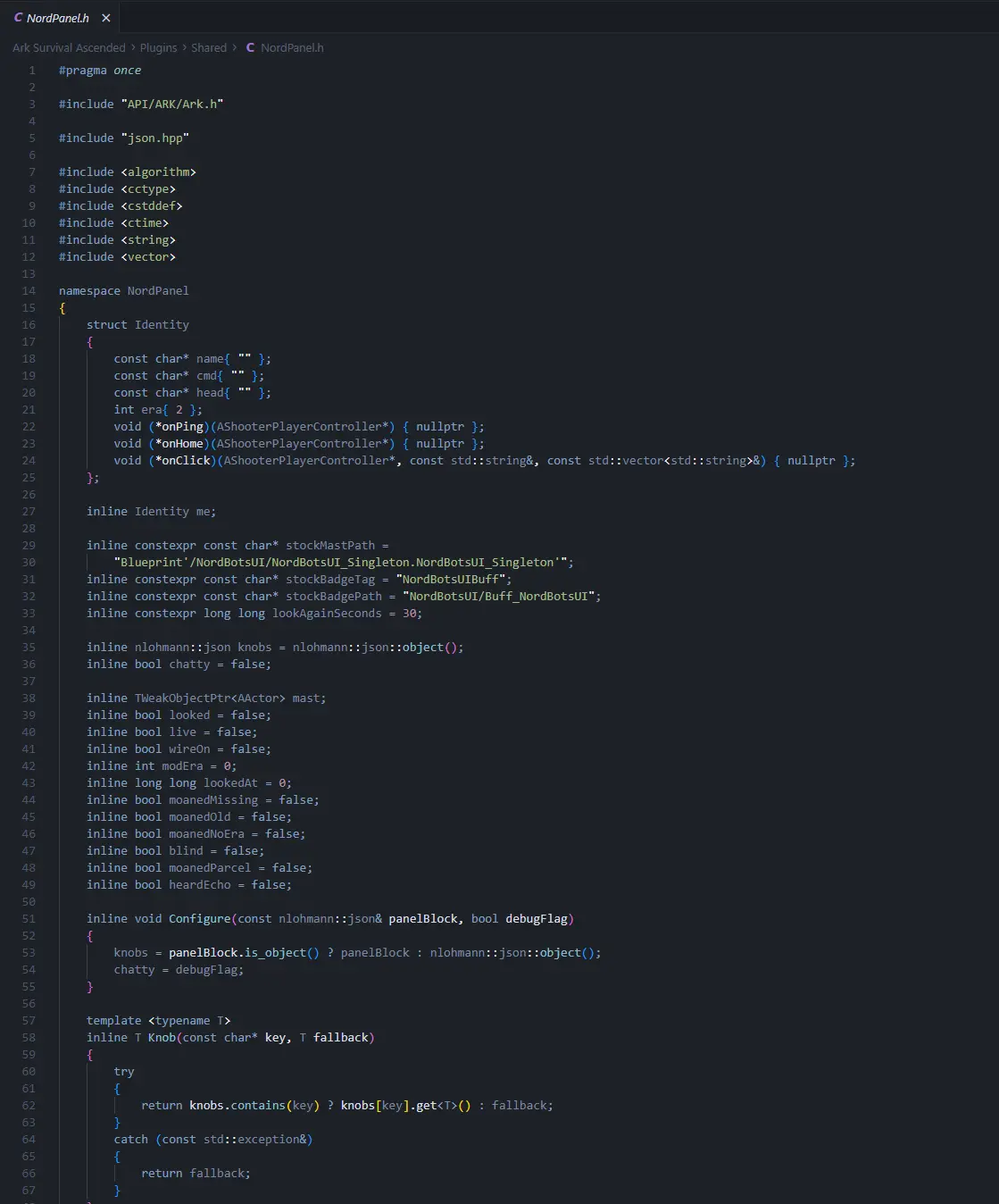
That is the whole step. Now #include "NordPanel.h" works from any of your headers. Here is what the header looks like sitting in its Shared folder:
Step 2, pick your prefix and introduce yourself
Every plugin on the pipe carries a short prefix, so the mod and the plugins never step on each other. Think of it as your plugin's call sign. BountyBoard uses NBB.. Pick your own: three or four letters and a dot, something unlikely to collide.
With your prefix chosen, introduce your plugin to the panel. Fill in this identity block once, at plugin load, before anything else touches the panel:
#include "NordPanel.h"

NordPanel::me.name = "mything";        // short name of your panel
NordPanel::me.cmd = "NMT.MyThing";     // the command word clicks come back as
NordPanel::me.head = "NMT.";           // your prefix, ends with a dot
NordPanel::me.era = 2;                 // protocol version, keep it at 2
NordPanel::me.onPing = &MyPing;        // player pressed Refresh
NordPanel::me.onHome = &MyHome;        // player asked for your main screen
NordPanel::me.onClick = &MyClick;      // player clicked one of your buttons
NordPanel::Configure(myConfig["Panel"], isDebug);
Those three callbacks are plain functions you write yourself. Here are their shapes:
void MyPing(AShooterPlayerController* pc);
void MyHome(AShooterPlayerController* pc);
void MyClick(AShooterPlayerController* pc,
             const std::string& id,
             const std::vector<std::string>& bits);
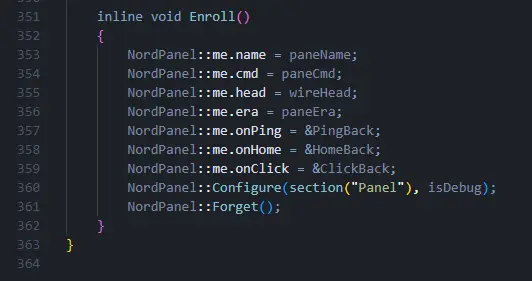
BountyBoard wraps its identity block in one small Enroll function, which keeps plugin load tidy:
Step 3, add the Panel block to your config
Next, give your config.json a Panel section. These are the stock values, and most servers never change them:
"Panel": {
  "Enabled": true,
  "RowsPerPage": 10,
  "BuffTag": "NordBotsUIBuff",
  "BuffPath": "NordBotsUI/Buff_NordBotsUI",
  "SingletonPath": "Blueprint'/NordBotsUI/NordBotsUI_Singleton.NordBotsUI_Singleton'",
  "RequireHandshake": false
}
Let's read through what you just pasted. Enabled set to false turns the whole window off, and your plugin runs chat only. The three path values tell the header where the mod lives, and they only change if we ever move things inside the mod. Leave RequireHandshake false unless you want the plugin to hold every window until the mod has said hello first.
One nice side effect of a clean Panel block: server owners on this site build config files like yours with sliders and toggles instead of a text editor. If you want to see what that feels like for them, read Edit A Plugin Config With The Configuration Editor.
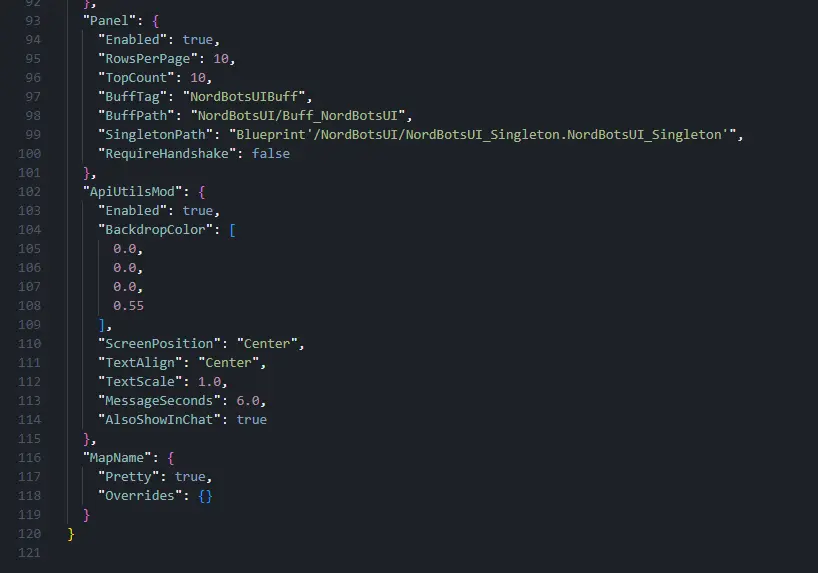
This is the Panel block sitting in a real config.json, next to the plugin's other sections:
Step 4, open the door at load, close it at unload
Now we open the connection. In your plugin load, right after the identity block:
NordPanel::Wire();
This hooks the one game function that button presses arrive through. And in your plugin unload:
NordPanel::Unwire();
Do not worry about other plugins here. The header shares the hook politely. Traffic that does not carry your prefix passes through untouched, so any number of plugins can do this at once.
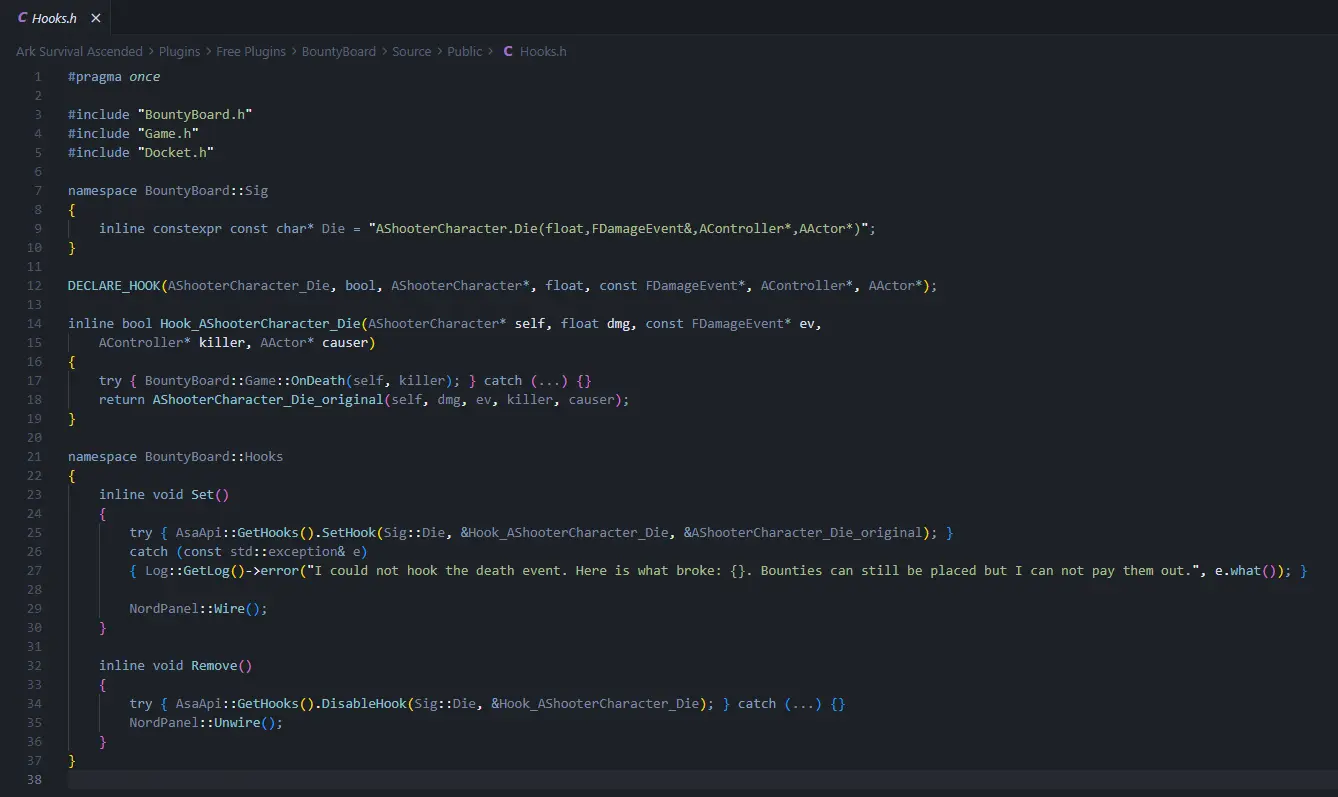
Here is how BountyBoard does it, with Wire in its hook setup and Unwire in its teardown:
Step 5, build a window and send it
Here is the fun part. A window is built with a Slip and sent with Hand. Read this small example top to bottom, then we will unpack it:
void ShowScores(AShooterPlayerController* pc)
{
    NordPanel::Slip slip;
    slip.face = "High Scores";                  // the big title
    slip.under = "Top players this week";       // the line under it
    slip.home = "home";                         // id sent when Home is pressed

    slip.Row("1. Steve", NordPanel::Money(12500), "gold");
    slip.Row("2. Alex", NordPanel::Money(9100));
    slip.Row("3. Sam", NordPanel::Money(7800), "grey", "view:sam", "View");

    slip.Key("mine", "My Score");
    slip.Ask("wager", "Place Wager", "How many points?");

    if (!NordPanel::Hand(pc, slip.Out()))
    {
        // no mod on this player, fall back to your chat output
        SendChatLines(pc);
    }
}
Now let's unpack the pieces you just used:
- Row takes a left text, a right text, and a color. The mod understands
grey,redandgold. Anything else draws in the plain default. A row can also carry its own small button. Give it an id and a label as the last two arguments, like the Sam row above. - Key puts a button along the bottom of the window. When the player presses it, the id comes back to your
onClick. - Ask is a button that opens a text box first. The player's typed answer comes back with the click.
- Hand returns false when the window could not go out, usually because the player does not run the mod. That is your cue to fall back to chat.
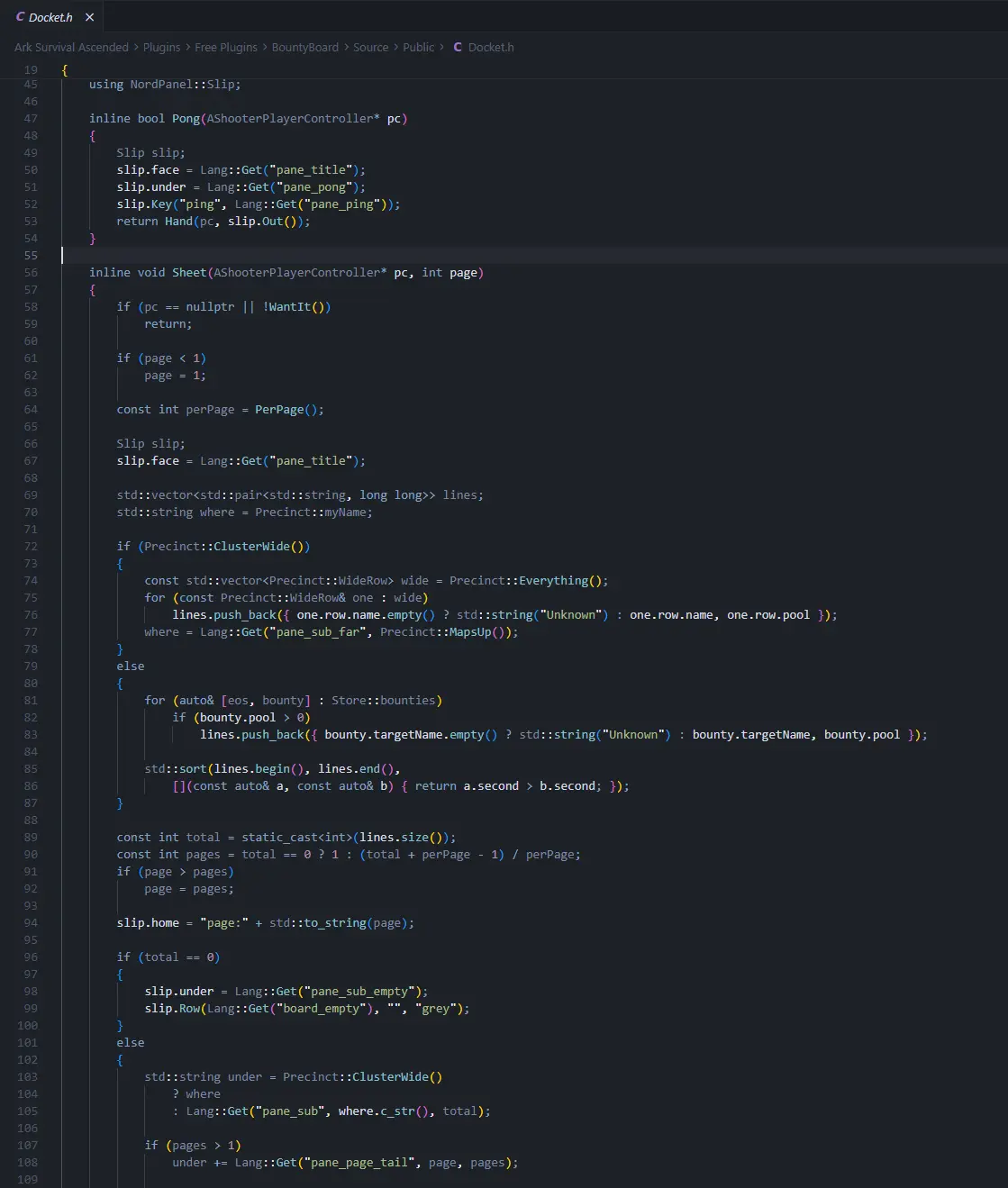
Want to see this at production scale? This is BountyBoard's real board screen doing the exact same dance, rows, pages and all:
Step 6, handle the clicks
When a button comes back, your onClick receives the button id and any extra words:
void MyClick(AShooterPlayerController* pc,
             const std::string& id,
             const std::vector<std::string>& bits)
{
    if (id == "mine") { ShowMyScore(pc); return; }
    if (id == "wager" && !bits.empty()) { PlaceWager(pc, bits[0]); return; }
}
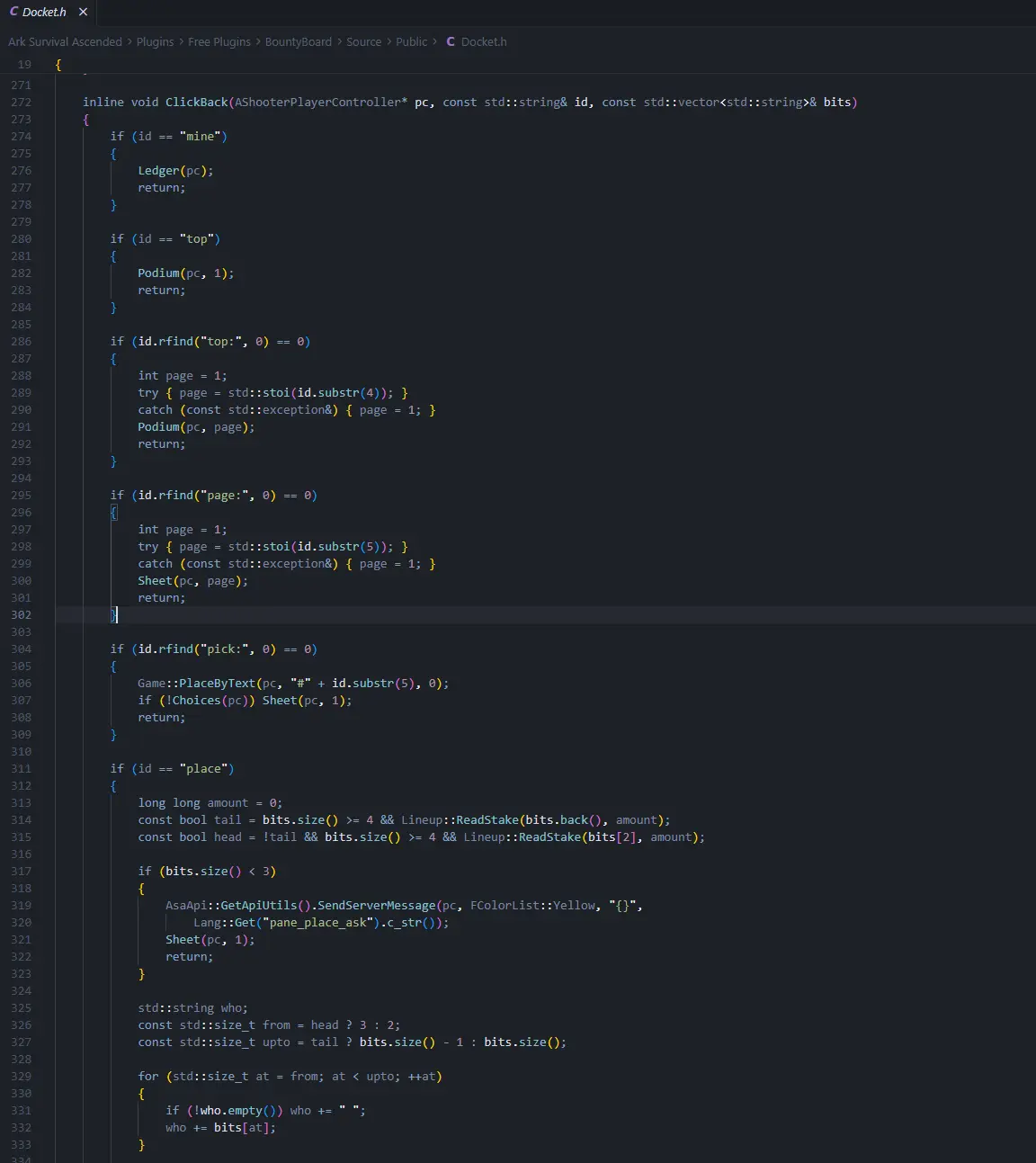
A bigger plugin ends up with a click handler that reads like a switchboard. BountyBoard's real one routes every button id to its action:
Before you move on, I want you to remember one rule above all the others. Never trust the window. A modded client can send any id it likes, so every click must run the exact same checks as the typed command. Same permission, same cooldown, same cost. Treat the window as a fancy keyboard, never as proof the player was allowed to press the key.
Step 7, test it
Time to see your window with your own eyes. Work through this checklist:
- Start your test server with your plugin, and the NordBots UI mod in the server's mod list.
- Join with a client that has the mod installed.
- Trigger your window. With debug on, your log shows a line like
I pushed a window of 240 characters at PlayerName on NMT.Panel. - The window draws, and when it does, the mod answers back on
NMT.Got. If the push line shows but nothing draws, check the mod version on both the server and the client first. - Leave the mod out of the client once, and confirm your chat fallback still reads well. Plenty of players will live there.
If all five passed, congratulations. Your plugin has a window.
Good manners on the pipe
You share this pipe with every other plugin on the server, so let's keep it clean:
- Send one window per screen, never a burst of small messages.
- Keep payloads lean. A title, ten rows and a few buttons is the sweet spot.
- Keep your chat commands working forever. The mod is a bonus, never a requirement.
- Do not put secrets in a payload. It travels to one player, but that player's machine can read it.
Need help
The BountyBoard repo is your reference build, and Docket.h in particular is the file to study. For anything this page does not answer, email [email protected] or ask in our Discord. Bring your log lines and we will figure it out together.
Frequently asked questions
- Does the window work for players who do not have the mod?
- No, and that is fine. Hand returns false when the player has no mod, and your plugin falls back to its normal chat output. Nothing breaks for them.
- Can more than one plugin use the mod at the same time?
- Yes. Every plugin picks its own short prefix, and the header shares the hook politely. Traffic that does not carry your prefix passes through untouched.
Stuck on something this page does not cover? Email [email protected] or ask in our Discord.